
If you’re new to IPTV, you’ve probably come across the term M3U and wondered what it means and why it’s so important. Simply put, an M3U IPTV playlist file is the gateway to streaming your favorite live TV channels and on-demand content. It acts as a roadmap for your IPTV app, telling it where to find and how to play specific streams.
In this guide, we’ll walk you through what an M3U file is, how it works, and how to use it — with a special focus on how it fits into IPTV streaming in Canada. Plus, we’ll cover how to download IPTV files from URL and what makes M3U a great choice for IPTV streaming in 2025.
An M3U file is a playlist format originally designed for audio files, but it’s now commonly used in IPTV to organize and stream live TV and VOD content. The file doesn’t contain the media itself — just the URLs to those media sources. Think of it like a directory for your media player.
Example:
A typical M3U entry includes metadata like #EXTINF:-1, followed by the stream URL. These entries tell your player how to display and categorize the content.
An M3U link is a URL pointing to your playlist, usually hosted on a remote IPTV server. Your IPTV app fetches it directly, allowing you to access live TV streams and on-demand content as it updates in real-time.
| Type | Pros | Cons |
|---|---|---|
| Free | No cost, easy to access | Unstable, poor quality, legally risky |
| Paid | HD/4K streams, EPG, secure | Monthly fee, trusted sources required |
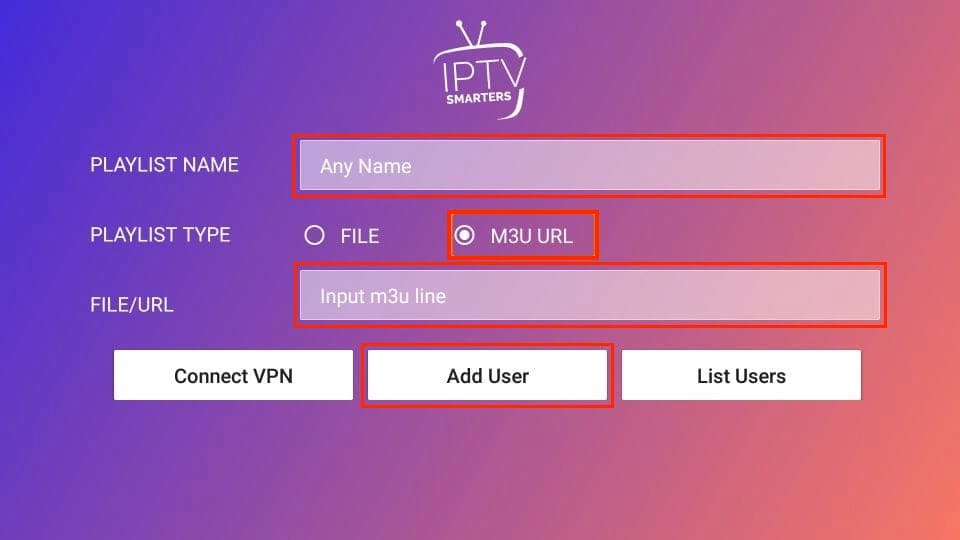
If you’re planning to stream using an M3U playlist, IPTV Smarters Pro is a great choice thanks to its clean interface and wide device compatibility.
Purple Player – Simple interface with parental controls and reliable live TV playback
IPTV Smarters Pro – A great balance between free and premium features, works smoothly with M3U playlists
OTT Navigator – Advanced features, strong EPG support, and powerful playlist management
XCIPTV Player – Fast, modern IPTV player with a TV-friendly interface, web-based playlist management, and solid M3U support
| Type | Legal? | Notes |
| Licensed IPTV | ✅ Yes | Bell, Rogers, etc. |
| Pirated IPTV | ❌ No | Illegal, high risk |
| Gray Market | ⚠️ Varies | Use a VPN, verify provider |
To stay safe, use a VPN and verify your provider is licensed or reputable.
While newer formats like Xtream Codes, Stalker Portal, and custom IPTV APIs are gaining traction, the M3U playlist remains the most flexible and widely supported IPTV format in 2025 — and here’s why:
1. Maximum Device Compatibility
M3U files work on nearly every IPTV player — including VLC, IPTV Smarters, TiviMate, GSE Smart IPTV, and Smart TVs. Whether you’re on Android, iOS, Windows, macOS, or Linux, M3U is supported out of the box.
2. Simple to Use and Share
One M3U URL can grant access to thousands of channels and VOD streams. It’s also editable — so advanced users can personalize or split playlists by interest, language, or region.
3. Cloud-Friendly and Easy to Update
Because most M3U playlists are cloud-hosted, updates are done remotely. Your IPTV app always pulls the latest version without needing manual updates or reinstallation.
4. Perfect Balance of Flexibility and Performance
In 2025, M3U remains the best choice for users who want freedom of app choice, multi-device use, and easy access to live and on-demand TV. It’s efficient, widely adopted, and supported by virtually all modern IPTV services.
An M3U IPTV playlist empowers you to take full control of your viewing experience, from channel organization to the apps and devices you stream with. Whether you’re looking for HD sports, family entertainment, or French-Canadian programming, M3U files make IPTV streaming simple, flexible, and powerful. With the right player and our reliable IPTV service, you can enjoy a smooth, personalized setup without hassle, extra steps, or unnecessary complications.